
Q: Waxing Check-in
delodiBeauty
0.00.00 Reviews
- Version
- 1.21.0
- Installs
- 50.00K
- Age Rating
- Everyone
Screenshots
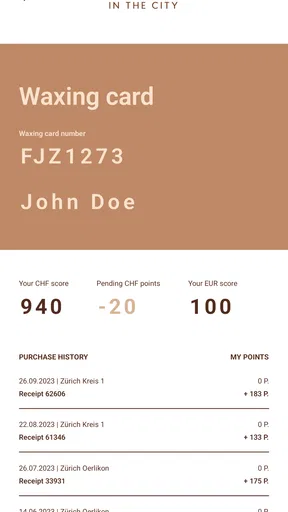
Our Review of Q: Waxing Check-in
 Analysis by Appyee
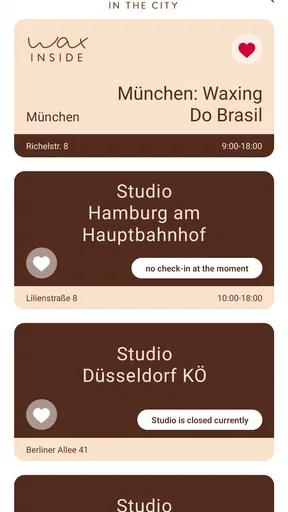
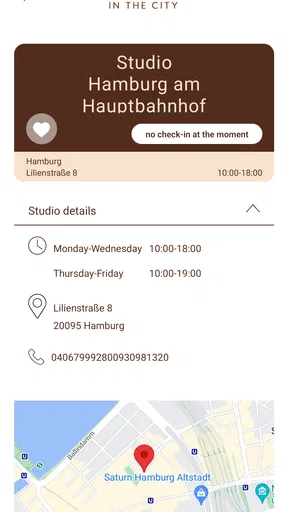
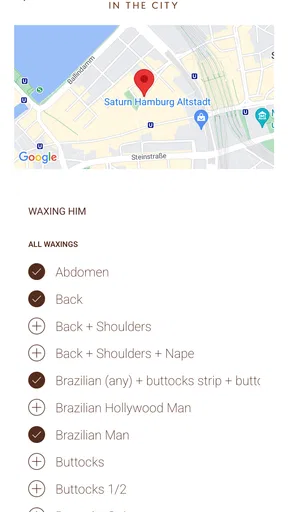
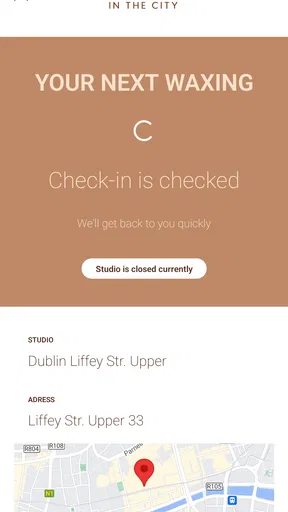
Q: Waxing Check-in is a small beauty app from delodi built around one very specific moment: checking in for a WAX IN THE CITY appointment. I found its appeal easy to understand during the first few uses. Instead of treating a waxing visit like a general beauty booking task, it focuses on the arrival step and keeps that action separate from the rest of the experience.
That narrow purpose is both its strength and its limitation. If you regularly visit WAX IN THE CITY and want a simple way to handle check-in, the app can feel pleasantly direct. If you are looking for salon discovery, detailed treatment planning, reminders, aftercare guidance, or a complete beauty-management tool, you may quickly feel that it stops short of being a daily companion.
How Q: Waxing Check-in fits into a real routine
When I fold Q: Waxing Check-in into an appointment routine, I think first about making the arrival step calm rather than rushing to use a screen at the door. A useful habit is to decide in advance whether I’ll check in digitally or speak with staff, then keep that backup simple. That small choice matters even more when a busy entrance, travel delays, or a low phone battery changes what is practical.
The first-week appeal is all about removing one small interruption
During the first week, I noticed that the app’s value comes less from exploration and more from repetition. The store summary, “WAX IN THE CITY’S App,” sets the expectation clearly, while the short description, “Q: Waxing Check-in,” makes the central purpose even more focused. This is not an app that asks me to learn a complicated beauty system. It is meant to help with a check-in interaction.
That focus is useful when I am already on my way to an appointment. I do not want to search through a general salon app, open a website in a browser, or explain at the front desk that I have arrived if a dedicated check-in route is available. A purpose-built app can make that moment feel more organized, especially when I am carrying a bag, arriving from work, or trying not to hold up the next customer.
A realistic example is a lunchtime appointment. I leave the office with only a few minutes to spare, arrive at the location, and use the app instead of adding another conversation to the arrival process. The benefit is modest, but practical: the app is useful precisely because the task is small and time-sensitive. It does not need to entertain me or persuade me to browse.
New users should still approach it with the right expectation. Installing it does not automatically make every part of a waxing routine easier. Its strongest use case begins when I already know where I am going and what I need to do. I would not install it as a general beauty planner, nor would I expect it to replace every interaction with the salon.
What makes the focused design helpful
Many beauty apps try to combine appointment search, promotions, provider profiles, payments, reviews, loyalty programs, and treatment advice. That can be convenient, but it can also turn a simple arrival task into a sequence of screens. Q: Waxing Check-in takes the opposite approach. Its identity is tied to one service environment, so its usefulness depends on whether that environment is already part of my routine.
The first non-obvious advantage is that a specialized check-in tool can reduce decision-making at the exact point where I need speed. I do not have to decide whether I am browsing or booking; I am there to check in. That makes it better suited to an existing appointment than to spontaneous salon research.
The second insight is that the app’s value is situational rather than constant. I may not open it for weeks, but that does not necessarily make it unsuccessful. A tool used briefly at each visit can still earn its place if it makes arrival smoother. I judge it less like a social app and more like a digital key: uninteresting when I do not need it, useful when I do.
There is also a trade-off. A highly focused app can feel cleaner than a full salon platform, but it gives me fewer reasons to open it between appointments. That difference matters when deciding whether to keep it installed. Someone who prefers a single app for every beauty task may find the narrow scope inconvenient, while someone who values a quick check-in may appreciate the lack of clutter.
Month-to-month value depends on appointment frequency
After the novelty fades, the real question is whether I continue using it whenever I visit. For a regular WAX IN THE CITY customer, the answer can be yes, because the app remains connected to a recurring behavior rather than a one-time download. Each appointment creates another opportunity for the same short workflow, and that consistency is more important than having a large feature set.
The app has been available since August 8, 2017, and its current version is 1.21.0. Those details suggest a product with a longer life than a temporary promotional experiment, while the install figure of over 50 thousand indicates that it has reached a meaningful audience without making it a universal beauty platform. I would interpret that combination cautiously: it is established enough to take seriously, but still specialized enough that personal usefulness matters more than popularity.
Its month-to-month value is strongest for people who visit the same brand repeatedly. I can imagine keeping it installed because the small amount of effort saved at each appointment adds up over time. The benefit is not dramatic after one visit; it is the accumulated convenience of not having to rediscover the process every time.
For occasional customers, the calculation changes. If I visit only once or twice a year, I may forget the app between appointments, and the installation can become digital clutter. In that case, using whatever arrival method the salon already provides may be simpler. The app is not automatically more convenient just because it is dedicated.
How to make the recurring workflow less awkward
My practical advice is to treat Q: Waxing Check-in as an appointment-day tool rather than something to browse casually. I would place it where it is easy to find, open it before reaching the reception area, and avoid waiting until I am standing in a crowded entrance. That small habit matters more than repeatedly exploring the app.
I would also test the check-in process calmly on the first visit rather than assuming that installation alone completes everything. A dedicated check-in app is most useful when I know what screen or action begins the arrival process. Learning that once prevents the common frustration of opening an app at the last second and still needing help.
A further tip is to keep a backup expectation. Even when a digital check-in is convenient, I would still be prepared to tell staff my name or appointment details if needed. That is not a criticism unique to this app; it is sensible for any tool used at a physical location. The app should reduce friction, not make me feel stuck if the normal human process is faster on a particular day.
This is where the app differs from a general booking service. A broad platform may be better for comparing salons or arranging an appointment from scratch. Q: Waxing Check-in is better when the relationship and destination are already decided. Choosing between them is not about which app has more features; it is about whether I need discovery or arrival support.
The maintenance burden is low, but not invisible
Because the app has a narrow purpose, the maintenance burden is mostly mental rather than operational. I do not need to manage a complicated beauty profile just to check in, and the free price removes a financial reason to reconsider the installation. It is also rated for Everyone, which makes its intended audience broad rather than restricted to a particular age group.
On Android, the listed minimum operating system is Android 7.0. That keeps the app accessible to people using older compatible devices, although I would still make sure the phone has enough free space and that the operating system is functioning normally before an appointment. A check-in tool is not the place where I want to discover that my device has been neglected.
The developer is delodi, and the current version is 1.21.0. When I use an app for a recurring physical routine, version updates matter less for entertainment value and more for confidence. I want the basic path to remain predictable. I would update it when prompted through the normal app-store process, but I would not expect updates alone to transform it into a complete salon-management platform.
The hidden maintenance trade-off is that a specialized app can become easy to forget. If I do not visit for several months, I may not remember why it is installed. That means its low day-to-day burden is balanced by occasional reorientation. For a frequent customer, this is barely noticeable. For an infrequent customer, it may make the app feel unnecessary between visits.
Another useful distinction is between device maintenance and routine maintenance. The app can help with the check-in moment, but it does not replace the personal preparation around a waxing appointment. I still need to manage my schedule, leave enough travel time, and remember the appointment itself. Anyone expecting the app to carry the entire habit will probably be disappointed.
Where fatigue can set in
The main source of fatigue is repetition without expansion. If every use is limited to the same check-in action, the app may remain useful but never become engaging. That is acceptable for a utility, yet it means I should not judge it by the standards of a richer beauty service with content, recommendations, or ongoing planning.
There is also a risk of opening the app at the wrong time. If I expect it to help me choose a treatment, compare locations, or manage broader appointment details and it does not serve that purpose, the experience can feel incomplete. The solution is not necessarily a redesign; it is using the app for the job it appears built to handle and relying on the salon’s usual channels for everything else.
A less obvious weakness is dependency on context. The app’s usefulness is tied to WAX IN THE CITY rather than to waxing in general. Someone who visits several unrelated salons will not get the same recurring value from it. A general booking platform, a calendar, or the salon’s broader customer service route may be more practical for a mixed routine.
I would also skip it if I strongly prefer not to install single-purpose apps. The free price makes trying it easy, but free does not mean frictionless. Every additional app takes up attention, storage, and a place on the home screen. If the check-in benefit is too small for my visits, the app may not justify that space.
On the other hand, people who dislike unnecessary conversations at reception may find the focused design genuinely worthwhile. For them, the app is not competing with a full beauty platform. It is competing with a short but recurring in-person interruption, and that is a fair contest.
Who should keep it installed
I would recommend keeping Q: Waxing Check-in installed if three conditions are true: I visit WAX IN THE CITY regularly, I prefer handling arrival digitally, and I can remember to use the app before or during the check-in moment. When those conditions line up, the app earns lasting space through habit rather than novelty.
I would be more hesitant for someone who is still deciding where to book, who changes salons often, or who wants treatment advice and appointment planning in one place. That person would probably get more value from a broader alternative or from using the salon’s existing booking and communication methods.
It is also not the right choice for someone who expects a waxing app to provide a complete personal-care routine. The dedicated check-in purpose is clear, but it should not be mistaken for a full guide to preparation, aftercare, scheduling, or beauty discovery. Its usefulness begins at the threshold of the appointment, not across every stage of the experience.
My long-term verdict
After looking beyond the first impression, I see Q: Waxing Check-in as a practical niche utility rather than an app I would open for entertainment or exploration. That is not a flaw by itself. A small tool can be successful when it handles one recurring task with less effort than the usual alternative.
Its lasting value comes from consistency. If I regularly use WAX IN THE CITY, the dedicated check-in workflow can become a quiet part of my appointment habit. I would not expect it to change my beauty routine, but I could see it making the arrival step more orderly and less dependent on a front-desk exchange.
My honest recommendation is conditional: try it if WAX IN THE CITY is already your regular destination, then judge it after several appointments rather than after the first launch. The important test is whether I remember to use it naturally and whether it makes arrival easier in real circumstances. If it does, the free app has earned its place. If I rarely visit or need broader salon features, uninstalling it is reasonable.
Q: Waxing Check-in earns lasting space through repeated convenience, not through a large feature list. That makes it a good fit for a specific customer and a poor fit for anyone searching for a universal beauty app. I would recommend it to regular WAX IN THE CITY visitors who want a focused check-in option, while steering everyone else toward a broader booking tool or the salon’s normal contact channels.
Verdict
Strengths of Q: Waxing Check-in
- Quick check-in helps reduce waiting time at busy salons.
- Useful for keeping appointment details organized in one place.
- Simple interface is easy to understand for first-time users.
- Can make salon visits more convenient for regular customers.
- Digital check-in may reduce the need for paper forms.
Limitations of Q: Waxing Check-in
- Features may be limited if your salon does not fully support the app.
- Requires internet access for reliable check-in and updates.
- Not useful for users who visit participating salons infrequently.
- You may need to share personal details during the check-in process.
- App availability and performance can vary by salon location.
Similar Picks in This Category
View All
Beauty Makeup Editor & Camera
Photo & Video Editors - Instant Solution4.7

Perfect365: Face Makeup Editor
Perfect365, Inc.3.5

Mirror Plus - HD Mirror app
Digitalchemy, LLC4.8

Cute Lock Screen & Wallpapers
Prometheus Interactive LLC4.6

HD Camera for Android
One Music Player4.5

Phone Mirror app - True Mirror
Cards4.6
Frequently Asked Questions
What is Q: Waxing Check-in used for?
Q: Waxing Check-in is designed to help waxing salons and their clients manage appointments and check-in procedures more efficiently. Depending on the salon’s setup, customers may be able to confirm their arrival, view booking details, complete required information, and receive updates about their visit. The exact features can vary because the app is generally connected to a participating salon’s scheduling system.
Can I book a waxing appointment directly through Q: Waxing Check-in?
The app may support appointment-related features, but booking availability depends on how the individual salon has configured its account. Some businesses may allow clients to schedule, reschedule, or review appointments in the app, while others may use it mainly for arrival and check-in. Before downloading, confirm that your preferred waxing location supports online booking through this application.
Do I need an account or invitation from a waxing salon to use the app?
In many cases, Q: Waxing Check-in is intended for customers of participating salons, so you may need an existing appointment, a phone number or email associated with your booking, or an invitation from the business. If the app does not recognize your details, it may not provide useful functionality. Contact the salon directly if you are unsure how to access your reservation.
Is my personal information safe when using Q: Waxing Check-in?
The app may request personal details such as your name, contact information, appointment data, or answers required by the salon before treatment. Review the privacy policy and permissions listed on the Google Play Store or App Store before creating an account. Also check whether notifications, location access, or other permissions are optional, and only provide information necessary for your appointment.
Does Q: Waxing Check-in work with every waxing salon?
No, the application is not necessarily a universal check-in tool for all waxing businesses. Its usefulness depends on whether your salon or spa has integrated the platform into its appointment and customer-management system. You can install the app, but you may not be able to check in or view bookings unless the business is supported. Verify compatibility with the salon before relying on it for your visit.
